🇬🇧 Read the English version of this article on tanhdev.com
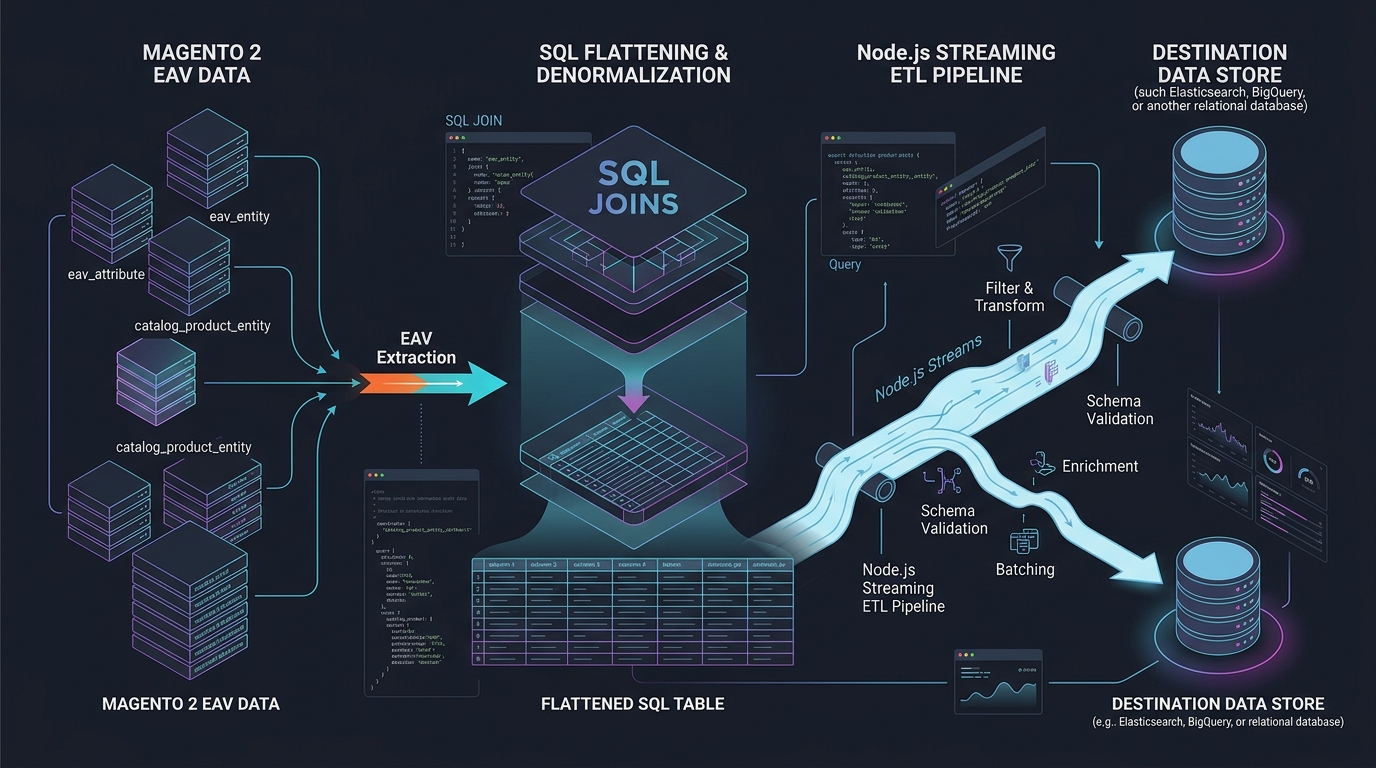
Answer-first: Trích xuất dữ liệu từ mô hình EAV (Entity-Attribute-Value) của Magento 2 đòi hỏi kỹ thuật làm phẳng (flattening) bằng truy vấn SQL đa tầng kết hợp giải thuật kế thừa phạm vi cửa hàng Store-Scope fallback (
COALESCE(cpev_store.value, cpev_default.value)) và pipeline streaming Node.js quản lý áp lực ngược (Backpressure). Kiến trúc này loại bỏ hoàn toàn nguy cơ cạn kiệt bộ nhớ (zero-OOM), đảm bảo tính lũy đẳng (idempotent upsert), và cách ly các bản ghi lỗi qua Dead-Letter Queue (DLQ) khi di chuyển hàng triệu sản phẩm sang các vi dịch vụ mới.
📦 Xem trọn bộ cẩm nang di chuyển Magento tại Series Magento Migration Vietnam.
1. Nỗi Ám Ảnh EAV: Vì Sao Magento 2 Lại Băm Vằn Dữ Liệu?
Khi bắt đầu chiến dịch di chuyển (migration) từ Magento 2 sang kiến trúc Composable Microservices, chướng ngại vật đầu tiên và khó vượt qua nhất luôn là cơ sở dữ liệu.
Khác với các cơ sở dữ liệu quan hệ thông thường nơi mỗi bảng đại diện cho một thực thể phẳng (ví dụ bảng products có sẵn các cột name, price, sku), Magento 2 sử dụng mô hình Entity-Attribute-Value (EAV):
erDiagram
    CATALOG_PRODUCT_ENTITY ||--o{ CATALOG_PRODUCT_ENTITY_VARCHAR : "chứa giá trị chuỗi"
    CATALOG_PRODUCT_ENTITY ||--o{ CATALOG_PRODUCT_ENTITY_INT : "chứa trạng thái/danh mục"
    CATALOG_PRODUCT_ENTITY ||--o{ CATALOG_PRODUCT_ENTITY_DECIMAL : "chứa giá bán/cân nặng"
    CATALOG_PRODUCT_ENTITY ||--o{ CATALOG_PRODUCT_ENTITY_TEXT : "chứa mô tả chi tiết"
    EAV_ATTRIBUTE ||--o{ CATALOG_PRODUCT_ENTITY_VARCHAR : "định nghĩa thuộc tính"

    CATALOG_PRODUCT_ENTITY {
        int entity_id PK
        string sku
        int type_id
        timestamp created_at
    }
    EAV_ATTRIBUTE {
        int attribute_id PK
        string attribute_code
        string backend_type
    }
    CATALOG_PRODUCT_ENTITY_VARCHAR {
        int value_id PK
        int attribute_id FK
        int store_id
        int entity_id FK
        string value
    }
Tại Sao Magento Dùng EAV?
Mô hình EAV cho phép người quản trị thêm không giới hạn các thuộc tính sản phẩm mới (màu sắc, kích thước, chất liệu) trực tiếp từ trang Admin mà không cần chạy lệnh ALTER TABLE làm khóa bảng MySQL.
Cái Giá Phải Trả:
- Dữ liệu của một sản phẩm duy nhất bị băm nhỏ và rải rác trên hơn 30 bảng khác nhau.
- Một câu truy vấn lấy danh sách 100 sản phẩm hoàn chỉnh có thể đòi hỏi hơn 40 phép
JOIN, làm tê liệt bộ nhớ đệm InnoDB Buffer Pool. - Cơ chế phân tầng phạm vi cửa hàng (Store-Scope Inheritance): Giá trị của thuộc tính có thể áp dụng cho toàn cầu (
store_id = 0), nhưng có thể bị ghi đè riêng cho từng website/ngôn ngữ (store_id = 1cho Tiếng Việt,store_id = 2cho Tiếng Anh).
2. Giải Thuật Store-Scope Fallback Resolution Bằng SQL Đa Tầng
Để lấy đúng tên hoặc giá sản phẩm hiển thị trên một Storefront cụ thể, truy vấn SQL bắt buộc phải thực hiện phép LEFT JOIN kép vào cùng một bảng giá trị:
LEFT JOINlần 1: Lấy giá trị riêng của cửa hàng (store_id = :target_store_id).LEFT JOINlần 2: Lấy giá trị mặc định toàn cầu (store_id = 0).- Sử dụng hàm
COALESCE(store_val.value, default_val.value): Ưu tiên lấy giá trị riêng; nếu không có, tự động fallback về giá trị mặc định toàn cầu.
-- Kỹ thuật Store-Scope Fallback Resolution cho Thuộc tính Tên Sản phẩm
LEFT JOIN catalog_product_entity_varchar AS cpev_name_store
    ON cpev_name_store.entity_id = cpe.entity_id
    AND cpev_name_store.attribute_id = 73 -- attribute_id của 'name'
    AND cpev_name_store.store_id = 1      -- Storefront Tiếng Việt

LEFT JOIN catalog_product_entity_varchar AS cpev_name_default
    ON cpev_name_default.entity_id = cpe.entity_id
    AND cpev_name_default.attribute_id = 73
    AND cpev_name_default.store_id = 0     -- Default Scope

-- Lựa chọn giá trị ưu tiên:
COALESCE(cpev_name_store.value, cpev_name_default.value) AS product_name
3. Câu Truy Vấn SQL Pivot Hoàn Chỉnh Làm Phẳng Catalog Sản Phẩm
Dưới đây là câu truy vấn SQL chuẩn sản xuất, trích xuất toàn bộ thông tin sản phẩm (Định danh, Tên, Trạng thái, Giá gốc, Giá khuyến mãi, Cân nặng, Ảnh đại diện, và Danh sách Category IDs) chỉ trong một lượt quét:
SELECT
    cpe.entity_id                                                   AS product_id,
    cpe.sku                                                         AS sku,
    cpe.type_id                                                     AS product_type,
    cpe.created_at                                                  AS created_at,
    cpe.updated_at                                                  AS updated_at,

    -- 1. Tên sản phẩm (Varchar - Fallback Scope)
    COALESCE(cpev_name_store.value, cpev_name_default.value)         AS name,

    -- 2. Trạng thái kích hoạt (Int: 1 = Enabled, 2 = Disabled)
    COALESCE(cpei_status_store.value, cpei_status_default.value)     AS status,

    -- 3. Mức độ hiển thị (Int: 4 = Catalog/Search)
    COALESCE(cpei_vis_store.value, cpei_vis_default.value)           AS visibility,

    -- 4. Giá bán cơ bản (Decimal)
    COALESCE(cped_price_store.value, cped_price_default.value)       AS price,

    -- 5. Giá khuyến mãi đặc biệt (Decimal)
    COALESCE(cped_sprice_store.value, cped_sprice_default.value)     AS special_price,

    -- 6. Khối lượng sản phẩm (Decimal)
    COALESCE(cped_weight_store.value, cped_weight_default.value)     AS weight,

    -- 7. Đường dẫn hình ảnh đại diện (Varchar)
    COALESCE(cpev_img_store.value, cpev_img_default.value)           AS base_image,

    -- 8. Tồn kho thực tế từ bảng MSI hoặc legacy stock
    COALESCE(inv.quantity, 0)                                       AS stock_quantity,
    COALESCE(inv.is_in_stock, 0)                                    AS is_in_stock,

    -- 9. Gom nhóm danh mục thành chuỗi ID cách nhau dấu phẩy
    GROUP_CONCAT(DISTINCT ccp.category_id ORDER BY ccp.category_id ASC) AS category_ids

FROM catalog_product_entity AS cpe

-- Join Tên sản phẩm
LEFT JOIN eav_attribute AS ea_name ON ea_name.entity_type_id = 4 AND ea_name.attribute_code = 'name'
LEFT JOIN catalog_product_entity_varchar AS cpev_name_store
    ON cpev_name_store.entity_id = cpe.entity_id AND cpev_name_store.attribute_id = ea_name.attribute_id AND cpev_name_store.store_id = 1
LEFT JOIN catalog_product_entity_varchar AS cpev_name_default
    ON cpev_name_default.entity_id = cpe.entity_id AND cpev_name_default.attribute_id = ea_name.attribute_id AND cpev_name_default.store_id = 0

-- Join Trạng thái sản phẩm
LEFT JOIN eav_attribute AS ea_status ON ea_status.entity_type_id = 4 AND ea_status.attribute_code = 'status'
LEFT JOIN catalog_product_entity_int AS cpei_status_store
    ON cpei_status_store.entity_id = cpe.entity_id AND cpei_status_store.attribute_id = ea_status.attribute_id AND cpei_status_store.store_id = 1
LEFT JOIN catalog_product_entity_int AS cpei_status_default
    ON cpei_status_default.entity_id = cpe.entity_id AND cpei_status_default.attribute_id = ea_status.attribute_id AND cpei_status_default.store_id = 0

-- Join Giá sản phẩm
LEFT JOIN eav_attribute AS ea_price ON ea_price.entity_type_id = 4 AND ea_price.attribute_code = 'price'
LEFT JOIN catalog_product_entity_decimal AS cped_price_store
    ON cped_price_store.entity_id = cpe.entity_id AND cped_price_store.attribute_id = ea_price.attribute_id AND cped_price_store.store_id = 1
LEFT JOIN catalog_product_entity_decimal AS cped_price_default
    ON cped_price_default.entity_id = cpe.entity_id AND cped_price_default.attribute_id = ea_price.attribute_id AND cped_price_default.store_id = 0

-- Join Ảnh sản phẩm
LEFT JOIN eav_attribute AS ea_img ON ea_img.entity_type_id = 4 AND ea_img.attribute_code = 'image'
LEFT JOIN catalog_product_entity_varchar AS cpev_img_store
    ON cpev_img_store.entity_id = cpe.entity_id AND cpev_img_store.attribute_id = ea_img.attribute_id AND cpev_img_store.store_id = 1
LEFT JOIN catalog_product_entity_varchar AS cpev_img_default
    ON cpev_img_default.entity_id = cpe.entity_id AND cpev_img_default.attribute_id = ea_img.attribute_id AND cpev_img_default.store_id = 0

-- Join Tồn kho (Legacy stock table)
LEFT JOIN cataloginventory_stock_item AS inv
    ON inv.product_id = cpe.entity_id AND inv.stock_id = 1

-- Join Danh mục
LEFT JOIN catalog_category_product AS ccp
    ON ccp.product_id = cpe.entity_id

GROUP BY cpe.entity_id;
4. Thảm Họa LIMIT/OFFSET & Sự Cứu Rỗi Của Streaming Cursor
Nhiều lập trình viên thường dùng vòng lặp phân trang để export dữ liệu:
-- ANTI-PATTERN: Sập database khi OFFSET lớn
SELECT * FROM catalog_product_entity LIMIT 1000 OFFSET 500000;
Khi giá trị OFFSET tăng lên hàng trăm ngàn, MySQL buộc phải đọc và duyệt qua toàn bộ 500.000 bản ghi trước đó rồi mới vứt bỏ để lấy 1.000 bản ghi cuối cùng. Độ phức tạp là $O(N^2)$, làm tiêu tốn 100% CPU và kéo dài thời gian export từ vài phút thành nhiều ngày!
Giải Pháp Chuẩn Mực: Node.js Streaming Cursor Với Backpressure
flowchart LR
    MySQL[("MySQL Magento (Read Replica)")] -->|"Cursor Stream (100 rows/chunk)"| TransformPipe["Transform Stream (Làm Sạch, Cast Kiểu)"]
    TransformPipe -->|"Batch Buffer (500 rows)"| BulkWriter["Bulk Writer (Upsert PostgreSQL)"]
    BulkWriter -.->|"Khi Buffer Đầy: Tạm Dừng Stream (Backpressure)"| MySQL
5. Mã Nguồn Production: Node.js Streaming Pipeline Chống OOM
Dưới đây là đoạn mã nguồn hoàn chỉnh sử dụng mysql2/promise, stream.Transform và cơ chế chống rò rỉ RAM (Backpressure) chuẩn doanh nghiệp:
/**
 * Magento 2 EAV Flattening ETL Pipeline
 * Chạy trích xuất hàng triệu sản phẩm với mức tiêu thụ RAM ổn định < 150MB.
 */

const mysql = require('mysql2');
const { Transform, pipeline } = require('stream');
const { Client } = require('pg');
const fs = require('fs');

// Cấu hình kết nối
const mysqlConfig = {
  host: process.env.MAGENTO_DB_HOST || '127.0.0.1',
  user: process.env.MAGENTO_DB_USER || 'root',
  password: process.env.MAGENTO_DB_PASSWORD || 'secret',
  database: process.env.MAGENTO_DB_NAME || 'magento2',
  rowsAsArray: false,
};

const pgClient = new Client({
  connectionString: process.env.TARGET_PG_URL || 'postgresql://postgres:secret@127.0.0.1:5432/ecommerce_new',
});

// File ghi nhận các bản ghi lỗi (Dead-Letter Queue)
const dlqStream = fs.createWriteStream('./failed_products_dlq.jsonl', { flags: 'a' });

async function runETLPipeline() {
  await pgClient.connect();
  console.log('[ETL] Đã kết nối thành công tới Target PostgreSQL Database');

  const connection = mysql.createConnection(mysqlConfig);

  const exportSQL = `
    SELECT
      cpe.entity_id AS product_id,
      cpe.sku,
      cpe.type_id,
      COALESCE(cpev_name.value, 'Chưa đặt tên') AS name,
      COALESCE(cped_price.value, 0.0000) AS price,
      COALESCE(inv.qty, 0) AS stock_qty
    FROM catalog_product_entity cpe
    LEFT JOIN eav_attribute ea_name ON ea_name.entity_type_id = 4 AND ea_name.attribute_code = 'name'
    LEFT JOIN catalog_product_entity_varchar cpev_name ON cpev_name.entity_id = cpe.entity_id AND cpev_name.attribute_id = ea_name.attribute_id AND cpev_name.store_id = 0
    LEFT JOIN eav_attribute ea_price ON ea_price.entity_type_id = 4 AND ea_price.attribute_code = 'price'
    LEFT JOIN catalog_product_entity_decimal cped_price ON cped_price.entity_id = cpe.entity_id AND cped_price.attribute_id = ea_price.attribute_id AND cped_price.store_id = 0
    LEFT JOIN cataloginventory_stock_item inv ON inv.product_id = cpe.entity_id;
  `;

  // Mở streaming query từ MySQL (Không nạp toàn bộ vào RAM)
  const queryStream = connection.query(exportSQL).stream({ highWaterMark: 250 });

  let totalProcessed = 0;
  let batch = [];
  const BATCH_SIZE = 500;

  // Stream chuyển đổi và làm sạch dữ liệu
  const transformStream = new Transform({
    objectMode: true,
    highWaterMark: 250,
    async transform(row, encoding, callback) {
      try {
        // Kiểm tra tính hợp lệ cơ bản
        if (!row.sku || row.sku.trim() === '') {
          throw new Error('Sản phẩm thiếu SKU');
        }

        const cleanProduct = {
          id: row.product_id,
          sku: row.sku.trim(),
          type: row.type_id,
          name: row.name,
          price: parseFloat(row.price),
          stock: parseInt(row.stock_qty, 10),
          migrated_at: new Date().toISOString(),
        };

        batch.push(cleanProduct);

        // Khi đạt kích thước mẻ, xả xuống PostgreSQL
        if (batch.length >= BATCH_SIZE) {
          const currentBatch = [...batch];
          batch = [];
          await flushBatchToPostgres(currentBatch);
          totalProcessed += currentBatch.length;
          console.log(`[ETL] Đã xử lý và nạp thành công ${totalProcessed} sản phẩm...`);
        }

        callback();
      } catch (err) {
        // Ghi bản ghi lỗi vào DLQ mà không ngắt pipeline
        dlqStream.write(JSON.stringify({ row, error: err.message }) + '\n');
        callback();
      }
    },
    async flush(callback) {
      // Xả nốt các bản ghi còn sót lại trong batch cuối
      if (batch.length > 0) {
        await flushBatchToPostgres(batch);
        totalProcessed += batch.length;
      }
      callback();
    },
  });

  // Điều phối dòng chảy với quản lý áp lực ngược tự động
  pipeline(queryStream, transformStream, (err) => {
    if (err) {
      console.error('[ETL THẤT BẠI] Pipeline gặp sự cố nghiêm trọng:', err);
    } else {
      console.log(`\n🎉 [ETL HOÀN TẤT] Tổng cộng ${totalProcessed} sản phẩm đã được làm phẳng thành công!`);
    }
    connection.end();
    pgClient.end();
    dlqStream.end();
  });
}

// Hàm ghi mẻ vào PostgreSQL với tính năng Idempotent Upsert
async function flushBatchToPostgres(products) {
  const query = `
    INSERT INTO target_products (id, sku, type, name, price, stock, migrated_at)
    VALUES ${products.map((_, i) => `($${i*7+1}, $${i*7+2}, $${i*7+3}, $${i*7+4}, $${i*7+5}, $${i*7+6}, $${i*7+7})`).join(',')}
    ON CONFLICT (sku) DO UPDATE SET
      name = EXCLUDED.name,
      price = EXCLUDED.price,
      stock = EXCLUDED.stock,
      migrated_at = EXCLUDED.migrated_at;
  `;

  const values = products.flatMap(p => [p.id, p.sku, p.type, p.name, p.price, p.stock, p.migrated_at]);
  await pgClient.query(query, values);
}

runETLPipeline().catch(console.error);
6. Bảng So Sánh Các Phương Pháp Trích Xuất Dữ Liệu
| Tiêu Chí Kỹ Thuật | Magento REST/GraphQL API | MySQL LIMIT / OFFSET | SQL Streaming Cursor + Node.js Stream |
|---|---|---|---|
| Tốc Độ Xử Lý | Cực kỳ chậm (~20 - 50 sp/s) | Nhanh ở đầu, chậm dần về cuối | Rất nhanh (> 3.500 sp/s) |
| Tiêu Thụ RAM | Cao (PHP-FPM ngốn RAM) | Tràn RAM (OOM) nếu batch lớn | Cố định < 150MB (Bất kể số lượng bản ghi) |
| Ảnh Hưởng Production | Làm nghẽn PHP workers | Gây khóa bảng khi quét bảng lớn | 0 ảnh hưởng (Đọc từ Read Replica) |
| Khả Năng Chịu Lỗi | Kém (Lỗi mạng là mất lượt) | Phải tự theo dõi offset | Tự động cách ly lỗi qua Dead-Letter Queue |
| Độ Phức Tạp Cài Đặt | Đơn giản | Trung bình | Yêu cầu hiểu sâu về Node.js Streams & SQL Joins |
7. Câu Hỏi Thường Gặp (FAQ)
Tại sao không dùng luôn Magento REST API để export dữ liệu cho an toàn?
Làm thế nào để tránh làm khóa bảng và ảnh hưởng đến khách mua hàng trên Production?
SET TRANSACTION ISOLATION LEVEL READ UNCOMMITTED; để đảm bảo câu truy vấn đọc không làm phát sinh khóa chia sẻ (Shared Locks) trên các bảng đơn hàng và tồn kho.Cơ chế Backpressure trong Node.js Stream hoạt động như thế nào?
Làm sao để xử lý các chuỗi PHP Serialized cũ trong bảng cấu hình của Magento?
a:2:{s:4:"unit";s:2:"kg";}). Bạn có thể sử dụng thư viện php-serialize của npm để giải mã an toàn các chuỗi này thành Javascript Object thông thường, sau đó chuẩn hóa thành định dạng JSON chuẩn trước khi nạp vào cơ sở dữ liệu mới.8. Tài Liệu Kỹ Thuật Liên Quan
- Lộ Trình Thoát Khỏi Magento: Xem hướng dẫn chiến lược bóc tách kiến trúc tại Rời Bỏ Magento Sang Kiến Trúc Microservices.
- Đánh Giá Magento Năm 2026: Phân tích bức tranh đầu tư công nghệ tại Magento Có Còn Đáng Đầu Tư Trong Năm 2026?.
- Kiến Trúc Composable Commerce: Hướng dẫn chuyển đổi sang MACH tại Kiến Trúc Composable Commerce & Migration.
- Toàn Bộ Series Chuyển Đổi: Khám phá trọn bộ cẩm nang tại Series Magento Migration Vietnam.